Microsoft Crypto Clipper Malware Steals Wallet Data via Tor

Microsoft Crypto Clipper Protection: What You Must Do Now
What if plugging in a USB drive was all it took to hand your crypto wallet to an attacker on the other side of Tor?
Microsoft Threat Intelligence and Microsoft Defender Experts published a detailed warning on June 17, 2026, about a Microsoft crypto clipper campaign that has been active since February 2026. The malware steals clipboard data, hijacks wallet addresses, and routes every stolen byte through the anonymizing Tor network — making it extremely difficult to trace back to its operators.
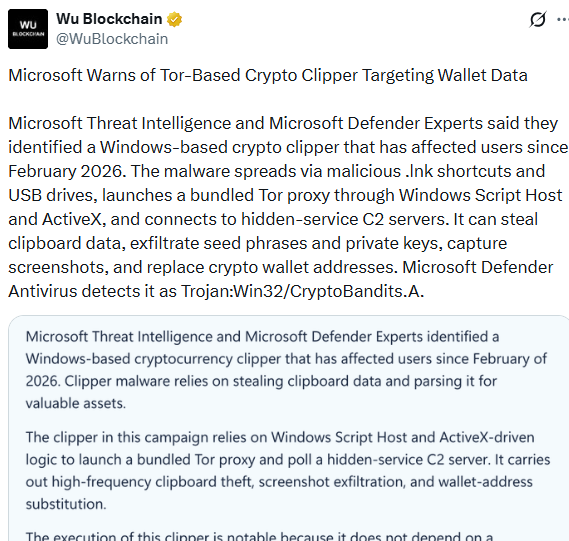 Source: X(formerly Twitter)
Microsoft Defender Antivirus detects the threat as Trojan:Win32/CryptoBandits.A. But detection only matters if the malware hasn't already infected your machine — and this one spreads in a way most people never expect.
How the Microsoft Crypto Clipper Spreads and Hides
The Microsoft crypto clipper doesn't arrive through a phishing email or a fake download link. It spreads through infected USB drives — a method that bypasses most people's mental model of malware risk entirely.
According to Microsoft's official blog, malicious .lnk shortcut files distributed on USB storage devices kick off the infection. The shortcut scans the USB device for common files like .doc, .xlsx, and .pdf, hides the originals, and creates lookalike shortcuts with the same file names. When a user clicks what looks like their own document, they actually launch the malware. The user is never aware they triggered an executable.
Once active, the crypto clipper behaves like a worm — it copies itself onto any new USB drive plugged into the infected machine afterward, spreading silently from device to device without any internet connection required for that step.
Here's what makes this campaign technically unusual:
It checks for Task Manager running and shuts down immediately if detected — a basic but effective anti-analysis trick
It launches a renamed, portable Tor client called ugate.exe in a hidden window
It waits roughly 60 seconds for Tor to fully start, then registers the infected device with a hidden-service command server using a unique victim ID
All communication routes through localhost on port 9050 — a local Tor proxy — meaning there's no exposed IP address for defenders to block
Microsoft's research team noted the malware does not depend on a traditional installer or exposed IP-based infrastructure. Instead, it deploys a portable Tor client, blending data theft with remote code execution — turning what looks like a simple password stealer into a lightweight backdoor.
What the Microsoft Crypto Clipper Steals From Your Wallet
The Microsoft crypto clipper is built specifically to hunt cryptocurrency data — and it checks your clipboard roughly every 500 milliseconds while running.
Three categories of theft happen simultaneously:
Seed phrase theft: The malware detects 12 or 24-word BIP39 seed phrases — the master recovery key to a digital wallet — the moment they're copied to your clipboard. It saves a local backup, exfiltrates the phrase through Tor, and only deletes the local copy after confirming successful transmission.
Private key extraction: It also scans for Ethereum and Bitcoin WIF private keys, validating captured values against a word list before sending them to the attacker.
Wallet address substitution: This is the core "clipper" function. When you copy a digital currency wallet address to send funds, the malware silently replaces it with an attacker-controlled address that closely mimics the original — matching the first two or last characters depending on the address format, across Bitcoin, Tron, and Monero formats.
The malware also captures five screenshots, ten seconds apart, uploading them asynchronously through Tor. Microsoft's analysis confirmed this gives the attacker visual context on the victim's wallet balances and habits — turning a blind data theft operation into an informed one.
If the attacker's server sends back an "EVAL" command, the Microsoft crypto clipper executes arbitrary code on the infected machine immediately — meaning the threat extends well beyond digital asset theft into full remote control.
Microsoft Crypto Clipper Protection: What You Must Do Now
Microsoft's guidance is clear: behavioral detection matters more than static signatures for catching this Microsoft crypto clipper campaign, because the malware is heavily obfuscated at the file level.
Five actions The firm specifically recommends:
Disable AutoRun and AutoPlay for all removable media immediately — this is the single most effective step against the USB-based spread
Block .lnk file execution from removable drives through Group Policy
Restrict unnecessary use of wscript.exe and cscript.exe, the script hosts the malware relies on
Watch for local SOCKS5 proxy activity on localhost:9050 — a strong behavioral signal of this specific threat
Review systems for clipboard-inspection or wallet-address-replacement patterns, especially on devices used for financial transactions
For everyday digital wallet users without enterprise security tools, the practical takeaway is simpler: never plug in an unfamiliar USB drive, and always verify a wallet address character-by-character after pasting it — never trust the clipboard blindly, especially right before confirming a transaction.
Based on Microsoft's own technical analysis, the Microsoft crypto clipper campaign has been running undetected by many victims since February 2026 — a four-month window before public disclosure. That gap is exactly why USB hygiene and address verification habits matter more than any single security product.
Conclusion
The Microsoft crypto clipper campaign proves that digital currency theft doesn't always require clicking a phishing link — sometimes it just requires trusting a USB drive. Tor-based command servers, clipboard hijacking every half-second, and silent address swaps make this one of the more sophisticated wallet-draining threats of 2026. Disable AutoPlay today. Verify every wallet address you paste. That habit alone blocks this entire attack chain.
YMYL Disclaimer
This article is for informational and educational purposes only. It does not constitute cybersecurity advice, financial advice, or a substitute for official guidance from the firm or a qualified security professional. All technical details are sourced directly from Microsoft's official page. Malware behavior, detection names, and threat indicators may evolve as the firm continues its investigation. Always run updated antivirus software, follow your organization's official IT security policies, and verify wallet addresses independently before any cryptocurrency transaction. CoinGabbar is not affiliated with the firm.