Samsung Wallet Solana USDC: Live Availability and Custody

Samsung Wallet Solana USDC: Live Availability and Custody
Your Galaxy phone's wallet app now holds digital dollars. But what changed on launch day, and who keeps the money safe? Here's a source-checked look at Samsung Wallet USDC, from availability to custody.
Is Samsung Wallet Solana USDC Live in the US Now?
Yes, eligible users can buy, hold, send, and receive USDC on Solana directly through Samsung Wallet.
Date | Event | Source |
7 Oct 2026 | Samsung announces the feature. | Samsung Newsroom |
Last week of Oct 2026 | Planned launch window | Samsung Newsroom |
2 Nov 2026 | The stablecoin account goes live. | Solana Foundation |
5 Nov 2026 | The Foundation publishes its post. | Solana Foundation |
Some press reports call 5 November launch day. That's the date of Solana's post, not the launch.
What Do Samsung and Solana Officially Say About It?
Samsung says the feature starts with USDC, a US dollar stablecoin. A stablecoin is a token built to hold a steady value, here one dollar. Circle issues USDC.
At launch, the feature reaches 82 million compatible US Galaxy devices, per Samsung. That counts devices, not people who signed up. Our earlier Solana launch coverage has the first reactions.
Samsung also says Bastion and Coinbase power the service. Samsung itself isn't the bank, the sender, or the custodian.
Who Is Eligible for a Samsung Wallet Stablecoin Account?
You must be a US resident aged 18 or older with a Samsung Account.
Your Galaxy phone must work with Samsung Wallet and run Android 13 or higher. You also need to register, verify your identity, and set up biometric login. Biometric login means a fingerprint or face check on your registered phone.
Samsung doesn't say how long registration takes. New York residents are excluded.
Can New York Residents Use the Samsung Stablecoin Account?
No. The feature isn't open to New York residents.
Neither Samsung nor Solana has given a reason. Press reports link it to New York's BitLicense rules, which have kept several national crypto services out of the state.
Everyone else in the US needs to meet the same eligibility rules above.
How Does Samsung Wallet Send USDC Across Borders?
Transfers settle on Solana, a blockchain that records each move. USDC is the first and only coin supported for now.
You open the Stablecoin Account card in the Quick Access tab, tap Send, and pick a method. You can send to other US Samsung Wallet users or compatible crypto wallets. You can also pay out to qualifying bank accounts in more than 60 countries.
Bank recipients may get local currency and don't need a crypto wallet. The app lists the supported countries. Biometric login comes first.
Samsung's announcement names both Solana and Sui as network partners. For other network news, see our Solana weekly update.
Who Holds USDC in Samsung Wallet: Bastion or Coinbase?
Not Samsung. It says accounts, custody, and money movement come from regulated partners. Samsung isn't a bank, a money transmitter, or a custodian. It doesn't hold customer funds.
A custodian is a firm that holds assets for you. Bastion is a licensed stablecoin custodian overseen by US financial regulators. It holds a New York trust charter and has preliminary conditional OCC approval for a national trust bank charter.
Coinbase is Bastion's sub-custodian, a second layer that safeguards all the USDC through Coinbase Prime Vault. So USDC custody sits with partners, and their terms apply.
Do You Control the Private Keys in Samsung Wallet?
Not the way a standard crypto wallet works. Samsung says users can get started without installing another app or managing private keys themselves.
That makes the account custodial. Bastion and Coinbase hold the USDC for you, and you act through your registered phone.
The trade-off is plain. You skip the setup and the key risk, but you rely on the partners' controls. Read their terms before you load funds.
Does Samsung Wallet Charge Fees for USDC Transfers?
Samsung charges no fee to send USDC to external crypto wallets. The wallet or exchange that receives it may add its own fee. Speed depends on network conditions.
Bank payouts do carry fees. They vary by country and amount, and the app shows the fee and an estimated delivery time before you confirm.
Recipient bank eligibility varies, so some banks or account types won't work. Transfers to sanctioned jurisdictions are prohibited. Our launch date and fees guide covers the earlier fee details.
What Other Costs and Limits Should Users Know About?
Topping up with a credit card, including through Samsung Pay, carries a 4% fee, based on Samsung's disclosures as reported. Reports also say a first top-up of $50 or more can earn $25 in USDC; terms apply.
Samsung hasn't published bank transfer fee amounts or transfer limits. You can't pay in shops with the balance yet.
Samsung says it may add online and in-store payments and more markets later. It gives no dates.
What Are the Main Security Risks for Samsung Wallet Users?
Start with custody. Your funds depend on Bastion and Coinbase controls and terms, not on Samsung's.
Next, access. A bank may sit outside the supported list, and a stablecoin can slip off its one-dollar target.
Last, mistakes. A blockchain transfer is hard to reverse, and a wrong address can mean a permanent loss.
Which Claims Are Confirmed and Which Are Only Reported?
Some details come straight from Samsung or Solana. Others come from press reports.
Claim | Status | Source |
Live on 2 Nov 2026 | Confirmed | Solana Foundation |
82 million compatible US Galaxy devices | Confirmed | Samsung Newsroom |
No Samsung fee to external wallets | Confirmed | Samsung Newsroom |
Bastion and Coinbase custody | Confirmed | Samsung Newsroom |
New York excluded | Confirmed | Solana Foundation, Samsung support page |
BitLicense as the reason | Reported | Press reports |
4% credit card top-up fee | Reported | Press reports of Samsung's disclosures |
$25 first top-up bonus | Reported | Press reports |
The reported rows have no primary page behind them yet. Check the app before you rely on them.
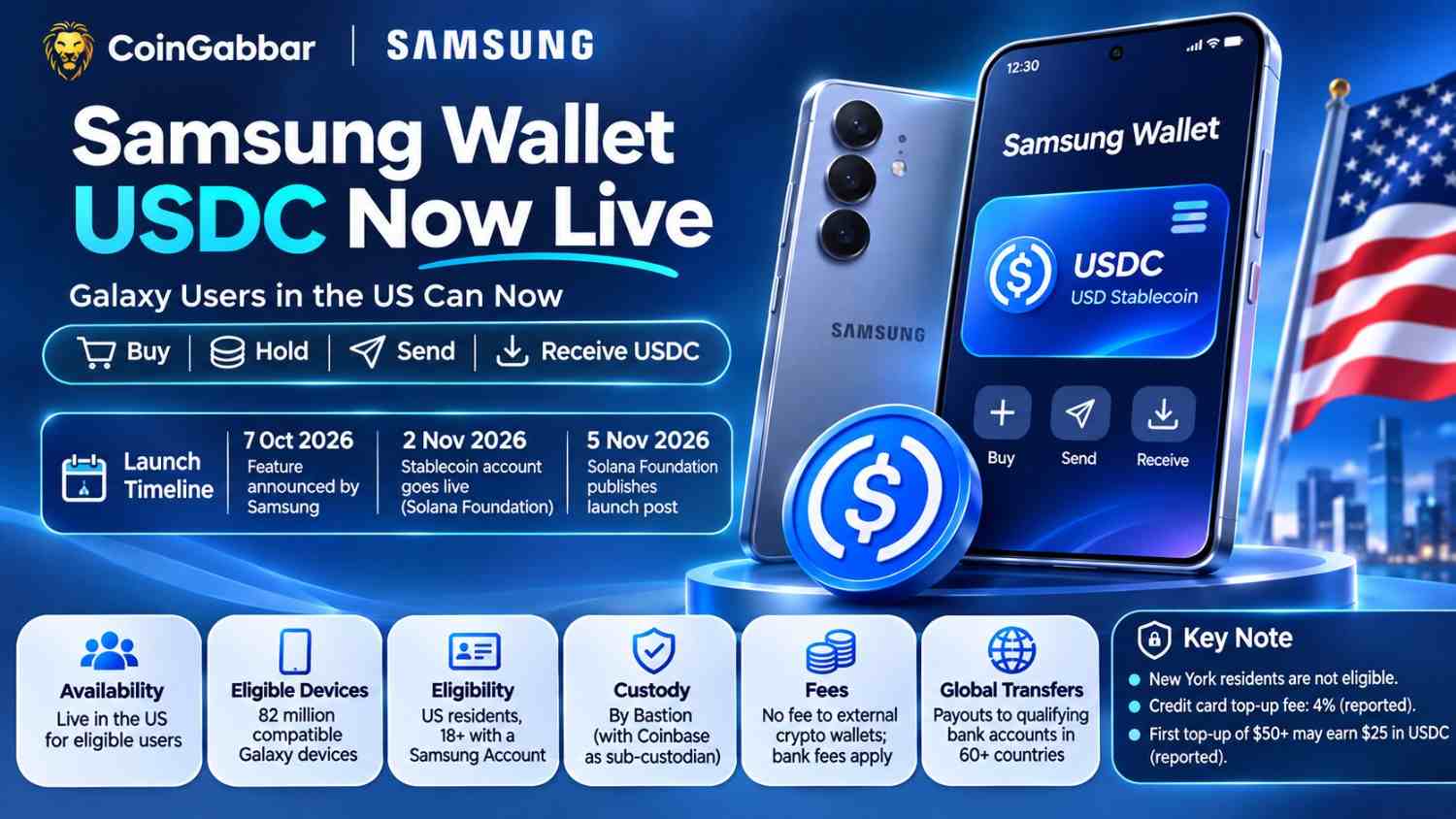
Launch-day dates differ too. Solana says 2 November, while some outlets say 5 November.
How Can You Verify the Status Before Sending Money?
Start with the two primary sources. Take a look at the Samsung Newsroom post and the Solana Foundation post, then verify the details on your phone.
Confirm you meet every eligibility rule, including your state.
Look for the Stablecoin Account card in the Quick Access tab.
Read the fee and delivery estimate on the confirmation screen.
Check that the receiving wallet accepts USDC.
If any step doesn't match, stop and ask Samsung Wallet support.
Expert Opinion
CoinGabbar analysis suggests this launch is a convenience layer, not a new kind of money. The coin, the chain, and the custody all come from partners.
For most readers, trust is the practical question. Who holds the funds and what each step costs matter more than the device count.
This view rests on Samsung's 7 October 2026 announcement, the Solana Foundation's 5 November 2026 post, and press reports of fee terms. It isn't based on hands-on testing.
Disclaimer: This article is for information only. It isn't financial or investment advice. Stablecoins and crypto transfers carry risk, and rules, fees, and offers can change. There is no guarantee of any outcome.