Sirius Network App: SRTsirius Download, APK and TestFlight Guide

How Is the SRTsirius App Update Changing Sirius Network Downloads?
Sometimes a favorite app vanishes from the store. That can feel scary. Is it gone? Is it safe to get it somewhere else?
That is the question behind the Sirius Network app. The team posted a notice to contributors about a big update. This guide explains where the app comes from now, how to install it, and how to avoid fake copies.
Key Takeaways
The SRTsirius app is getting a full update to improve its design and user experience.
Google Play download is paused for a while. Existing users can keep using the app as usual.
New users can get it from the official website, an Android APK, or iOS TestFlight.
A Quick Look at Sirius Network
Sirius Network is a mobile-first project. People join from a phone. They build an identity and earn credit for real actions, like learning, missions, and referrals.
The app is the front door. Users register, mine, study, and finish missions inside it. That is why the way people get the app matters so much.
Source: official website.
What Is the SRTsirius App?
SRTsirius is the name of the app. It is where a user makes a Sirius ID and joins the network. Everything starts here.
The Sirius Network official app is the one shared through the project’s own website and its verified account. Copies from other places are not the same thing.
For many contributors, the app is also the home of mobile mining. Daily activity, learning, and missions all happen there. So any change to the app touches the whole routine.
What the Notice Says
The notice came from the official X account under the title “Notice to Contributors”. It is short, so here is the whole picture.
Item | Detail |
App name | SRTsirius |
Reason | A full update to improve design and user experience |
Google Play | Download is paused for a while |
Existing users | Can keep using the app as usual |
New users | Download through official channels |
Next step | The team will share news when Google Play returns |
The notice also carries a “Community Notice” banner. It sets the tone: calm, short, and focused on users.
Sirius Network App Update: What It Means
The notice says the update aims to polish the design and the user experience. It does not list new features. It does not give a date.
The word to notice is “temporarily”. It means a pause, not a removal. The notice gives no other reason, so readers should not guess one.
For now, the best move is simple. Wait for the next official post.
Where to Find the SRTsirius Download
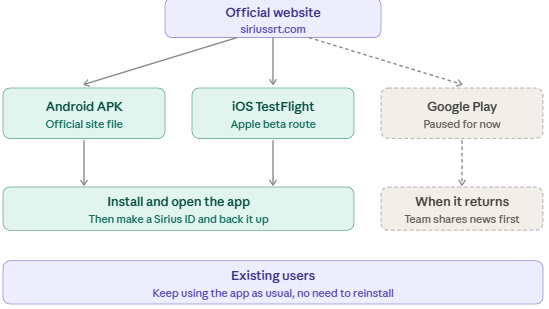
The notice names three official routes. Google Play is a fourth, but it is paused.
Channel | Device | Note |
Official website | Any | The starting point for every link |
Android APK | Android | A file from the official site |
iOS TestFlight | iPhone | Apple’s route for beta apps |
Google Play | Android | Paused for new downloads for now |
Here is the path in one view.
Open the official website
↓
Pick Android or iPhone
↓
Use the APK file or the TestFlight link
↓
Install and open the app
↓
Make a Sirius ID and back it up
Sirius Network App Install: Step by Step
On Android, open the official website on the phone. Tap the Android link and save the file. Then open it to install.
On iPhone, install the TestFlight app from the App Store first. Then open the TestFlight link from the official website. Tap to join and install.
After that, open the app and follow the sign-up steps. The Sirius ID comes first. A backup should follow right away.
Sirius Network Android App and the APK File
An APK is an installer file for Android. Google Play normally does the install for a user. With an APK, the user does it by hand.
That is why the source matters. The Sirius Network APK should come only from the official website. Android may ask for permission to install from outside the store. Readers should read that prompt and allow it only for this one file.
Sirius Network iOS App and TestFlight
TestFlight is Apple’s tool for testing beta apps. People join through an invite link. The app then installs like any other.
New iPhone users get the app this way. It works like an iOS beta, so builds can expire after a set time. Users may need to update the app later.
Source: official whitepaper.
How to Verify the Official App
Fake apps often copy the look of the real one. A few simple checks help.
Check | Why it matters |
Start at the official website | Fake sites copy the design |
Match the link to the official notice | It confirms the source |
Skip links in DMs, ads, and chat groups | These are common tricks |
Keep the Sirius ID backup private | It protects the account |
Read each install prompt | Extra permissions are a warning sign |
No check is perfect. But together they cut the risk a lot.
Mistakes to Avoid
A few slips cause most of the trouble. Here they are in plain words.
Some people grab the first link that appears in a search. Others trust a friend’s message without checking it. A few skip the backup of their Sirius ID. Each of these is easy to fix with a short pause.
The rule is simple. Slow down, start at the official website, and check twice before tapping install.
What Existing Users Should Do
The notice is clear. Existing users can keep using the app as usual. There is no need to remove it or start over.
Users should keep the Sirius ID backup safe. They should also watch the official channels for news. Any move to a new version should come from the project itself.
What Comes Next
The team plans to share news once the app returns to Google Play. No date has been given.
Until then, readers should trust only the official website and the official account. Dates and rumors from other places are not reliable.
Final Thoughts
The Sirius Network app is going through a big update, and Google Play downloads are paused for now. Existing users can carry on as usual, while new users can install the SRTsirius app through the official website, the Android APK, or iOS TestFlight. The safest habit is simple: start at the official website, skip links from strangers, and wait for the team’s next notice.
Disclaimer:This article is for information only and is not financial advice. App availability, download links, and update details can change, so readers should check the official channels before installing.