Chrome Extension Malware Campaign Hits 19 Browser Add Ons

19 Browser Extensions Used in a Growing Crypto Malware Campaign
Security researchers have uncovered a coordinated Chrome extension malware campaign spanning 19 separate browser add-ons—18 built for Chrome and one for Edge—all designed to quietly steal crypto wallet secrets, exchange login credentials, and general browser data once installed on a victim's machine, according to Socket's full research report.
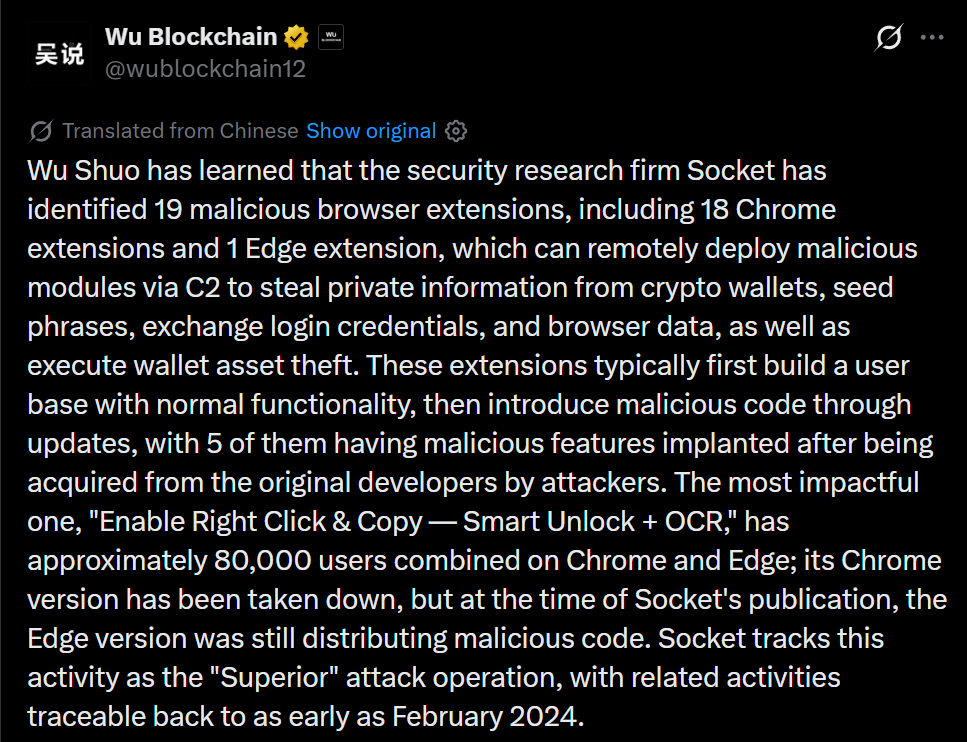
Source: WuBlockchain's coverage on X
How the Campaign Actually Operates
Researchers at Socket found that every add-on in this Chrome extension malware campaign follows the same playbook: they launch with genuine working functionality first, building a real user base, before a later update quietly introduces the malicious code.
Five of the nineteen were not built by the attackers at all—instead, they were legitimate tools bought outright from their original developers and then weaponized after acquisition.
Once installed, the tools establish a persistent WebSocket connection back to a command-and-control server, strip the page's Content Security Policy protections, and inject hidden form elements to trigger malicious scripts without leaving obvious traces, as documented in Socket's technical breakdown.
The Single Extension With The Widest Reach
One tool called "Enable Right Click & Copy — Smart Unlock + OCR" stands out as the most damaging single case in this entire Chrome extension malware campaign.
It was originally a clean, legitimate product before being acquired by the threat actor and had already built up a combined user base of roughly 80,000 people across both browser versions by the time malicious code was introduced.
Its listing on the main store has since been pulled, but researchers noted that at the time of publication the Edge version was still actively serving malicious code to installed users.
Analysts also flagged that some acquisitions in this pattern reportedly cost the attacker less than $2,000 for tools carrying around 10,000 existing users, making the buyout approach unusually cheap for the reach it delivers.
What The Malware Actually Steals
Once active, the injected modules go after a wide range of sensitive data rather than a single target. Key categories of theft observed include:
Multi-chain wallet draining across EVM, Solana, and Tron wallets by hijacking connect and swap buttons
Fake Ledger and Trezor recovery pages designed to capture a victim's full seed phrase
Session and login theft from major exchanges including Coinbase, Binance, Kraken, KuCoin, OKX, MEXC, and Bybit
A universal form grabber that captures anything typed into text, password, and email fields sitewide
Browser history exfiltration and Facebook or LinkedIn session token theft
Fake browser update prompts that trick victims into pasting and running attacker commands themselves
Campaign Origins And Ongoing Risk
Researchers are tracking this operation under the internal name "Superior," based on naming patterns found inside the malicious code itself, and say the technique overlaps trace-related activity back as far as February 2024, making this a multi-year effort rather than a single recent push.
The most concerning part of this pattern for everyday users is that browsers typically auto-update installed add-ons in the background, meaning a tool bought out and weaponized by an attacker can quietly reach thousands of existing users without any new install action required.
Key Facts At A Glance
Detail | Figure |
Total malicious add-ons identified | 19 |
Chrome extensions involved | 18 |
Edge extensions involved | 1 |
Add-ons acquired from original developers | 5 |
Combined users of the most impactful tool | Roughly 80,000 |
Campaign activity traced back to | February 2024 |
Status of the most impactful Chrome listing | Removed |
Status of its Edge counterpart at publication | Still active |
Source: Socket Threat Research
Conclusion
This wave of Chrome extension malware shows how attackers are increasingly buying trust rather than building it from scratch, acquiring tools with real, established user bases and weaponizing them through routine background updates.
Users are advised to review installed add-ons regularly, remove anything unnecessary or unfamiliar, and stay cautious about granting broad permissions to browser tools—especially any add-on that touches wallets or exchange accounts.
Disclaimer
This content is for informational purposes only and is not financial, investment, cybersecurity, or legal advice. Always verify information, do your own research, and use caution. We are not responsible for any losses or damages.
Also read:









