Why a High VRAM GPU Beats Fast Cores for AI and Crypto Nodes


What Is VRAM and Why Does a High VRAM GPU Matter?
Most people pick a node GPU the way they pick a gaming card. They chase clock speed and bragging rights. That is the wrong test. A high VRAM GPU often beats a faster card because memory decides what a node can run at all. This guide shows why and how to buy it.
For crypto and AI nodes, a high VRAM GPU matters more than fast cores. Memory size decides whether a job runs.
Memory speed decides how fast it runs. Core speed only helps after both are met. A used card with plenty of VRAM can beat a newer card with less.
What Is VRAM and Why Does a High VRAM GPU Matter?
VRAM is the memory built into your graphics card. The GPU reads it far faster than it reads system RAM. A node keeps its working data there.
Think of a workshop. The cores are the workers. VRAM is the table. Fast workers can't help if the job does not fit on the table. They wait, or the job stops.
Decentralized AI networks such as Render, Akash, and Bittensor lean on this table. So do GPU-mined coins. So the first question is size. Speed comes second.
Does the AI Model Fit in Your High VRAM GPU Setup?
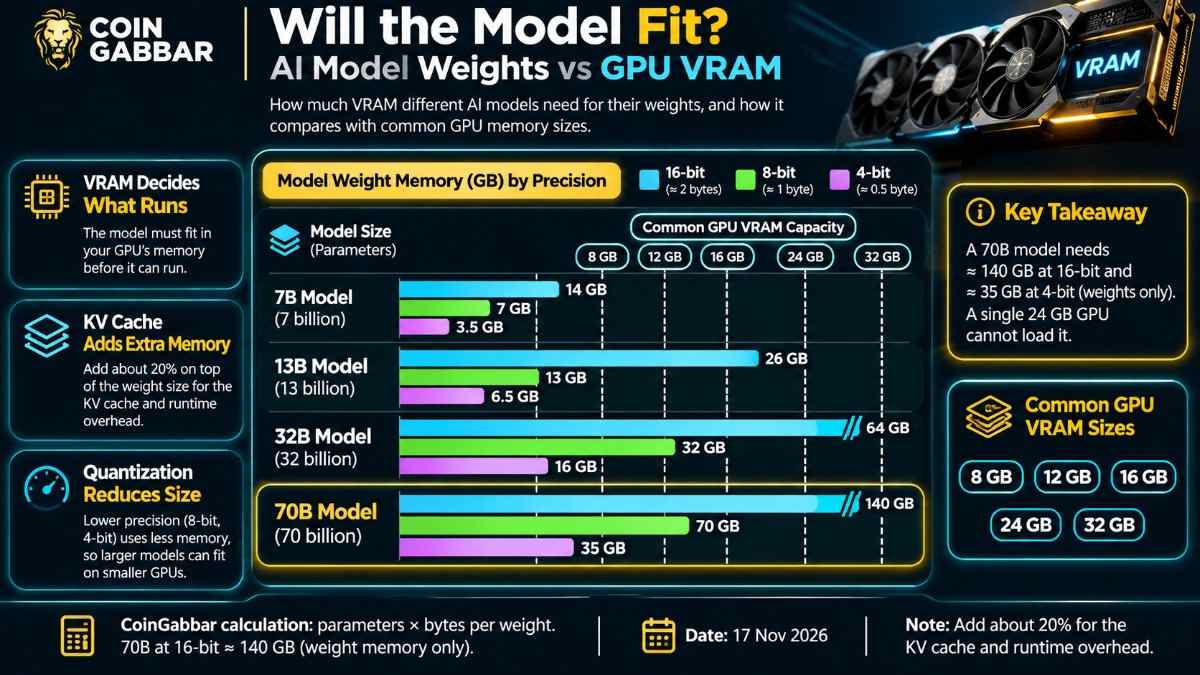
Every model needs memory for its weights. The rule of thumb is simple. Multiply billions of parameters by the bytes each one takes. A 16-bit weight takes 2 bytes, an 8-bit weight takes 1, and a 4-bit weight takes half a byte.
By that math, a 70-billion-parameter model needs about 140 GB at 16-bit. That is why even a fast 24 GB card can't load it. At 4-bit it drops to about 35 GB, which still needs two cards. The first image shows four common model sizes.
Add about a fifth on top for the KV cache, the memory that holds a chat's history. A bigger cache means longer chats and more users at once. That can lift what a node earns per hour, though earnings are never promised. For the rest of the PC around the card, see our crypto mining PC build guide.
Why Does Memory Speed Matter More Than Core Speed?
During text generation, the GPU reads the whole model from VRAM for every token. The cores finish fast, then wait. So the speed limit is memory bandwidth, not clock speed.
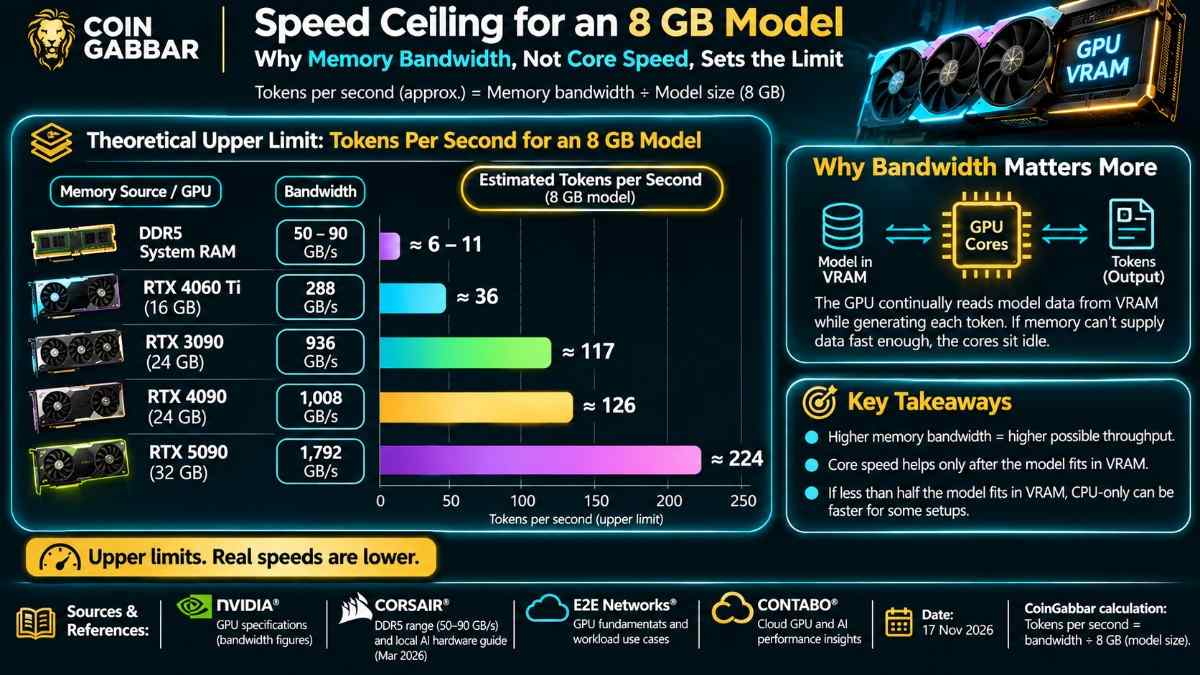
A March 2026 local AI hardware guide puts typical DDR5 system memory at 50 to 90 GB/s. It says an RTX 5090 passes 1,000 GB/s. That is about a tenfold gap.
By our division, tokens per second can't beat bandwidth divided by model size. The second image shows this for an 8 GB model. The same guide adds a warning. If under half the model fits in VRAM, running on the CPU alone is often better, because splitting the work adds delay.
Why Do Crypto Nodes Need a High VRAM GPU Too?
Some proof-of-work coins are built to resist ASICs by demanding faster VRAM. Algorithms such as KawPow and Autolykos keep a large lookup table, called a DAG, inside VRAM.
On many of these coins, that table grows over time. Once it passes your card's VRAM, the card is locked out, however fast its cores are. A high VRAM GPU stays useful for longer.
These algorithms also reward memory clocks more than core clocks. Pushing the core harder gains little.
Is a Used RTX 3090 Better Than a Newer Card With Less Memory?
Often yes, for intense work. The RTX 3090 has 24 GB on a 384-bit bus, about 936 GB/s. The newer RTX 4060 Ti 16 GB has a 128-bit bus and about 288 GB/s. The third image compares four cards.
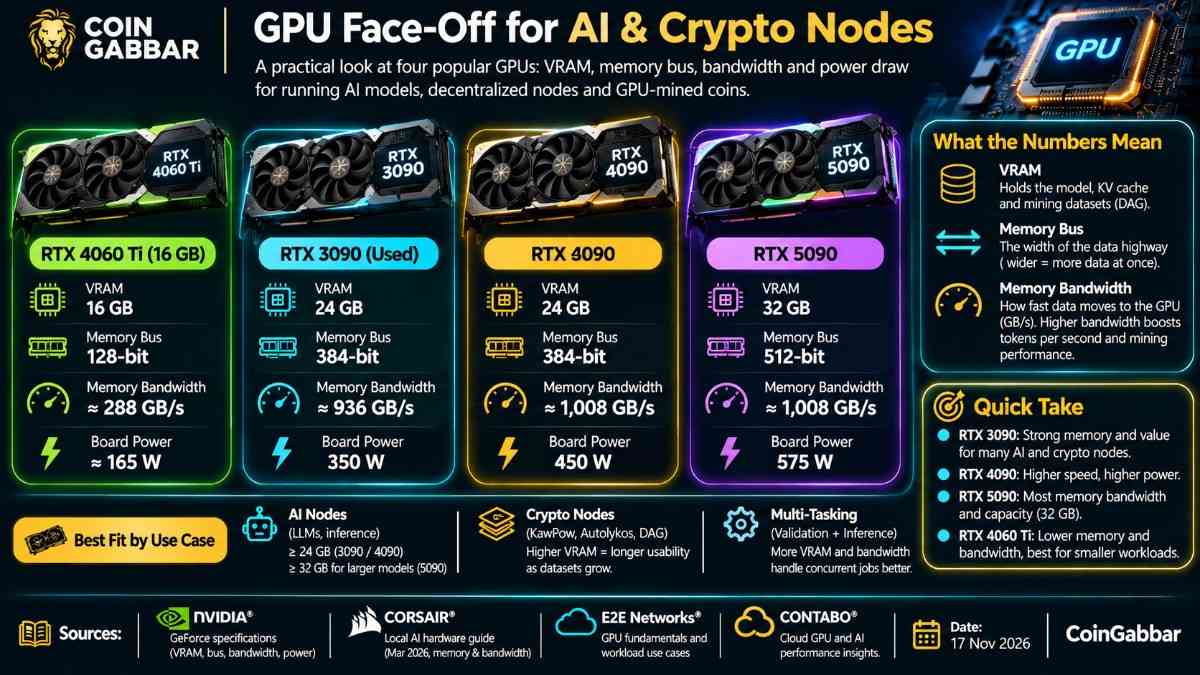
The RTX 4090 keeps 24 GB but adds speed and power draw. The RTX 5090 offers 32 GB and the most bandwidth, at 575 watts. For many nodes, a used 3090 is the sweet spot per dollar. Prices vary by country, so check your local used market.
Used cards carry risk. One may have run hot for years and has no warranty. Ask for a stress test and check memory temperatures before you pay.
How Do You Run a Node 24/7 Without Heat or Crashes?
Size the power supply for the card's board power plus about 30% headroom. Give the case strong airflow. On many cards the VRAM runs hotter than the core, so watch both.
VRAM-bound work rarely maxes the cores. So you can lower the power limit and save on bills with little speed loss. On Linux, install the NVIDIA driver, then use the nvidia-smi tool to set a power limit and watch temperatures. Our Pearl GPU mining setup guide shows a full rig.
The fourth image shows monthly power cost. The formula is watts divided by 1,000, times 24, times 30, times your rate. At an assumed 250 W, the bill is about $11 at the cheap rate and $63 at the costly one.
What Risks Can Make a VRAM-First Node a Bad Buy?
Needs change. Models grow, and a coin's table can outgrow even 24 GB. A card that fits today may not fit next year.
Demand is another risk. Node rewards depend on the network, token prices, and how many others join. No setup is promised to earn a profit.
Power prices matter most at 24/7 uptime. At high grid rates, a node can cost more to run than it returns.
Expert Opinion: Should Memory Come Before Core Speed?
CoinGabbar analysis suggests buying memory size first and core speed second. The basis is the model-size math, the bandwidth gap and the way DAG tables grow.

A power-limited used card with 24 GB is a safer first buy than a newer card with less VRAM. This view is not a forecast.
Disclaimer: This article is for information only and is not financial, legal, or tax advice. Node and mining returns are never promised or assured. Token prices, network rules, and power costs change, and hardware can lose value, so all the money spent can be lost. Consult a qualified adviser.