XE Network Testnet Guide: Wallet Setup, Faucet and Transfers

XE Network Testnet Guide: How to Claim XE and Complete Transfers
A testnet is a practice copy of a blockchain. It runs on test tokens, so mistakes cost nothing and users can learn the tools before real money is involved.
This XE Network testnet guide explains how the XE testnet works and how to use it, from the first wallet to the first transfer. It also covers common errors and the habits that keep a wallet safe.
Key Takeaways
Test XE comes free from a faucet: 1 XE per grant, up to 5 grants per account every 15 minutes.
Every transfer has two parts, so received XE stays pending until the recipient claims it.
The recovery phrase is the account. Anyone who has it controls the funds.
What Is XE Network?
XE Network is a Layer 1 (base-chain) platform for compute and networking. Its official website describes it as a network for autonomous software, built around identity, discovery, payment, compute and messaging.
On the testnet site, each account runs its own chain. This design is meant to let transactions settle in parallel, in about 3 seconds, with zero fees.
Source: official website.
What Is the XE Testnet?
The XE testnet is a working copy of the network that runs on test XE. Its purpose is stress testing. Weak spots found here are meant to be fixed before mainnet, according to the official XE X post.
The testnet is also unfinished. The docs state it is pre-1.0, so commands change and parts of the network can go down. Test XE is a practice token, and no source confirms it has any value.
Detail | What to know |
Asset | Test XE |
Fees | Zero |
Finality | About 3 seconds |
Network ID | Changes after a testnet wipe |
How to Use the XE Network Testnet
The basic route has five stages: create a wallet, back up the phrase, claim faucet XE, send XE, and check the result on the explorer.
XE testnet step by step
Step | Action | Tool |
1 | Create an XE wallet | Web wallet or CLI |
2 | Back up the recovery phrase | Pen and paper |
3 | Claim from the XE faucet | Wallet or CLI |
4 | Send to a second wallet | Wallet, CLI or SDK |
5 | Verify the transfer | Explorer |
The CLI (command-line interface) and SDK (software development kit) suit developers. The web wallet suits everyone else.
Source: official testnet page.
XE Wallet Recovery Phrase Backup
The web wallet shows a 24-word recovery phrase when an account is created. It then asks for three random words as a check. The docs state that the seed and phrase are encrypted inside the browser.
The phrase follows the BIP39 standard (Bitcoin Improvement Proposal 39). Wallets restore from 12, 15, 18, 21 or 24 words, and extra accounts can be added from the same phrase.
Safe handling comes down to three rules:
Write the words on paper. Skip screenshots and cloud notes.
Never type them into a website, chat or form.
Test with a fresh wallet, never one that holds real funds.
XE Testnet Faucet Explained
A faucet gives out free test tokens. The faucet pays from a pre-funded wallet and mints nothing, per the Getting Started docs.
Rule | Detail |
Grant size | 1 |
Limit | 5 grants per account every 15 minutes |
Same IP address | Also capped at 5 |
VPN, proxy or hosting network | Blocked |
Delivery | Pending until claimed |
How to Get Free XE on the Testnet
The faucet is the only free source the docs describe. In the web wallet, open the faucet screen and request XE. In the CLI, run xe faucet.
Use a home or mobile connection. Requests from VPN or hosting networks are rejected.
How to Claim XE from the Faucet
A grant arrives as a pending send. Claiming means signing for it, which takes three CLI commands:
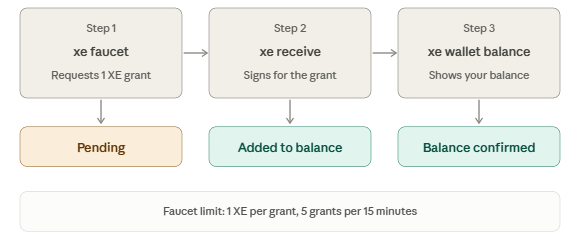
The first requests XE, the second claims it and the third shows the balance. The web wallet handles the claim from its main screen.
How to Send XE on the Testnet
Open the send screen, paste the recipient’s address and enter an amount. In the CLI:
xe send <address> 0.25 --asset XE --memo "hello world"
The address is a hash of the public key, so the two cannot be swapped. A memo can hold up to 64 bytes, according to the official X post. The sender pays no fee.
How to Receive XE on the Testnet
Every transfer is two blocks. The sender writes a send block on their own chain. The recipient then writes a receive block on theirs.
Stage | Who acts | Result |
Send block | Sender | XE pending |
Receive block | Recipient | XE in balance |
Run xe receive in the CLI, or claim from the wallet screen. Two wallets in separate seed files make a clean practice run.
XE Testnet Explorer
The explorer shows accounts, blocks, leases and the state of the network. After a transfer, paste either address to see the send and receive blocks. This is the quickest way to confirm that a transaction settled.
XUSD and the XE Node
XE is the native asset and carries voting weight. XUSD is a stablecoin that prices compute leases. Only operator accounts can mint it, so testers can view the lease market but cannot fund a lease.
An XE node needs Go 1.25 or later, Git, curl and make. The steps are to clone xeprotocol/xe, run make build, then start the node with the published genesis folder.
Source: official documentation.
Common Problems and Fixes
Problem | Likely cause | Fix |
Error 429 | More than 5 grants in 15 minutes | Wait the stated minutes |
Error 403 | VPN, proxy or hosting network | Switch to a home or mobile connection |
Balance still zero | Grant not claimed | Run xe receive |
Genesis mismatch | Testnet was wiped | Use the new genesis bundle and a fresh data folder |
No providers listed | None online | Check again later |
Safety Habits for Any Testnet
Testnet tokens are free, but the wallet habits are real. Official links do not prove a project is safe, so verify before connecting anything.
No faucet or support agent needs a recovery phrase.
Read the privacy page before connecting a wallet.
Treat any request for ID documents as a warning sign.
Rewards, token value and mainnet timing are unconfirmed in the sources used here.
Conclusion
This XE Network testnet guide covers the full loop: wallet, phrase, faucet, send, receive and explorer. Test XE is for practice, and the network can change or reset without notice. Recheck the official docs before each session.
Disclaimer: This article is educational and not financial advice.