How to Buy Pepeto ($PEPETO): Step-by-Step Guide


Why a Step-by-Step Pepeto Buying Guide Matters
New memecoin projects launch every week, and most buyers do not know where to start. Wallet setup, network fees, and presale steps confuse first-time buyers the most.
This guide explains how to buy Pepeto ($PEPETO) step by step, using only official information from the Pepeto website, so you know exactly what each step involves before you connect a wallet.
What Is Pepeto?
Pepeto is a memecoin project built on Ethereum. According to the project, it combines three tools in one ecosystem: a zero-fee exchange called PepetoSwap, a cross-chain bridge connecting Ethereum, BNB Chain, and Solana, and an AI token screening engine that checks contracts before a trade executes.
The $PEPETO token is the native token of this ecosystem. It is used across the exchange, the bridge, and the staking platform.
The project states that the token is currently available at presale pricing.
Why People Are Looking to Buy Pepeto
Presale-stage tokens usually price lower than a token's eventual exchange listing price, which is why some buyers look at projects early. Pepeto's presale also includes an option to stake tokens immediately after purchase, according to the official site.
Before deciding to buy a token, it helps to understand what the project offers and how the purchase process actually works. The sections below walk through both.
Things to Prepare Before You Buy Pepeto
A few basics make the process smoother. Have these ready before you start:
A crypto wallet. The official site recommends MetaMask for desktop users and Best Wallet for mobile users.
Funds in your web3 storage. ETH, USDT, and BNB are the accepted cryptocurrencies, according to the project.
A card, if preferred. Card payments are also supported as an alternative to crypto.
A stable internet connection and a few minutes of uninterrupted time to complete the transaction.
How to Buy Pepeto: Step by Step Guide
Each step below is based directly on the instructions published on the official website.
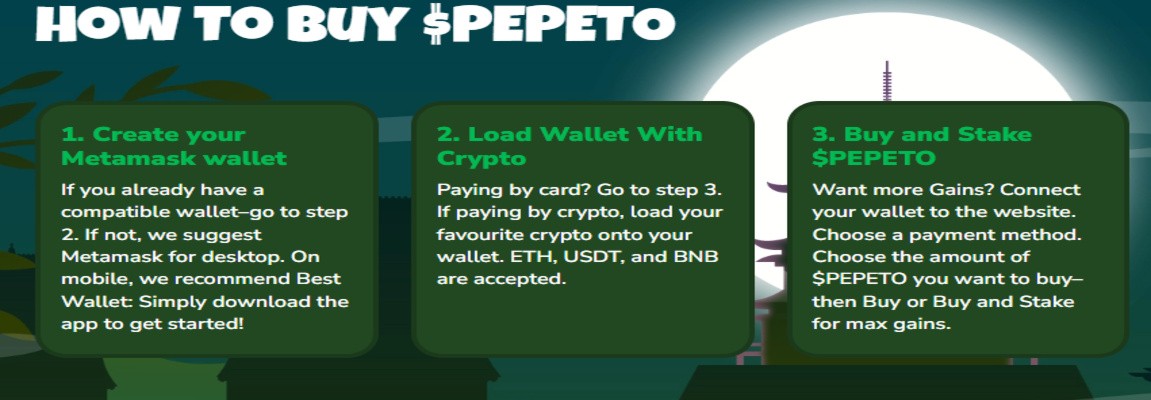
Source: Official Buy Guide
Step 1: Create or Connect a Compatible Wallet
If you already have a wallet like MetaMask, you can skip ahead to Step 2. If you do not have one, the official site suggests MetaMask for desktop use.
Mobile users are pointed toward Best Wallet, which is available as an app download. Setting up a new web3 storage usually takes a few minutes.
Write down your recovery phrase and store it somewhere safe, since it is the only way to recover the funds if you lose device access.
Step 2: Load Your Wallet With Crypto
If you plan to pay with a card, you can skip this step and go directly to Step 3.
If you are paying with crypto, load your wallet with one of the accepted currencies: ETH, USDT, or BNB.
Make sure you also keep a small extra amount in your storage to cover network gas fees, since these are paid separately from the amount you plan to use to buy tokens.
Step 3: Connect Your Wallet to the Official Website
Go to the official website and use the "Connect" option. Choose your payment method from the options shown: ETH, USDT, BNB, or Card.
Only connect your web3 storage through the official website link.
This step is where most scams try to intercept users through fake copies of legitimate sites, so always double-check the URL before connecting.
Step 4: Choose the Amount and Buy (or Buy and Stake)
Enter the amount of $PEPETO you want to purchase. The site displays the current presale price and the amount of tokens you will receive in real time.
You can choose a simple purchase or select "Buy and Stake" if you want to start earning staking rewards on your tokens right away, according to the official FAQ.
Step 5: Paying by Card (Alternative Path)
If you are paying by card instead of crypto, connect through a mobile or browser extension, then select "Card Payment" on the official site.
Follow the on-screen instructions to complete the transaction.
How to Claim Your $PEPETO Tokens
According to the official FAQ, tokens are not distributed before the presale ends. Once the presale closes, you need to reconnect your wallet to the official website and click "Claim."
Staked tokens and any rewards become claimable at the same time as your purchased tokens.
The blockchain you claim on depends on how you paid:
Payment Method | Claim Network |
ETH | Ethereum |
USDT | Ethereum |
Card | Ethereum |
BNB | BNB Chain |
Pepeto Tokenomics Overview
Understanding token allocation gives useful context before you buy tokens. According to the official tokenomics breakdown:
Allocation | Percentage | Stated Purpose |
Presale | 30% | Liquidity and early participation |
Staking | 30% | Rewards for long-term holders |
Marketing | 20% | Partnerships and campaigns |
Project Development | 7.5% | Ongoing development post-launch |
Liquidity | 12.5% | Exchange liquidity and trading stability |

Source: Official Tokenomics
The project states its smart contract was audited by SolidProof, covering the token contract, staking mechanism, and distribution architecture, with all findings resolved before the presale opened.
Risks to Know Before You Buy
Every crypto purchase carries risk, and presale-stage tokens carry additional risk compared to already-listed coins. Consider the following before buying Pepeto or any presale token:
Price volatility. Token prices can move sharply in either direction after launch.
Presale timing. According to the official FAQ, the presale is limited and can end at any time depending on demand.
Smart contract risk. An audit reduces certain risks but does not remove them entirely.
Wallet security risk. Losing a recovery phrase or connecting to a fake website can result in permanent loss of funds.
Regulatory differences. Rules around buying and holding crypto vary by country and region.
The official site itself notes that the crypto market can be volatile and that tax obligations may apply depending on your location.
Quick Checklist Before You Buy Pepeto
Wallet installed (MetaMask or Best Wallet)
Recovery phrase stored safely offline
Wallet funded with ETH, USDT, or BNB (or card ready)
Official website URL double-checked
Extra funds set aside for network gas fees
Decision made: Buy only, or Buy and Stake
Presale terms and claim process reviewed
Expert Opinion
The process of how to buy Pepeto follows a structure common to most presale-stage token launches: wallet setup, funding, connection to an official site, and a later claim phase.
The addition of an immediate staking option at the point of purchase is a design choice aimed at encouraging early holding rather than immediate resale.
As with any presale project, the audit and public contract disclosure are useful transparency signals, but they do not guarantee token performance after listing.
Buyers benefit from treating the official website, whitepaper, and audit report as their primary reference points rather than third-party price predictions.
Final Thoughts
Buying Pepeto step by step comes down to four core actions: set up a wallet, fund it, connect it to the official site, and choose how you want to purchase.
Claiming tokens happens later, after the presale ends, directly through the same official website.
Always verify you are using the correct, official Pepeto URL before connecting any wallet, and only rely on information published by the project itself.
Disclaimer: This article is for educational and informational purposes only. It does not constitute financial, investment, or trading advice. Cryptocurrency markets are volatile, and presale-stage tokens carry additional risk. Always do your own research and consult official project sources before making any purchase decision
Also read: